How I built receipt OCR: no cloud, no AI, measured
How I built a local tool that extracts company, tax ID, date, VAT and totals from receipt photos, how I tested it, and how I deployed it to a server as an API.
In a bookkeeping workflow, the company name, tax ID, date, VAT and total of hundreds of supermarket and restaurant receipts were being typed in by hand. The request was clear: drop the photos into a folder and get a single file out. So were the constraints: no cloud services, no AI (LLM), and ideally it should run on an ordinary CPU.
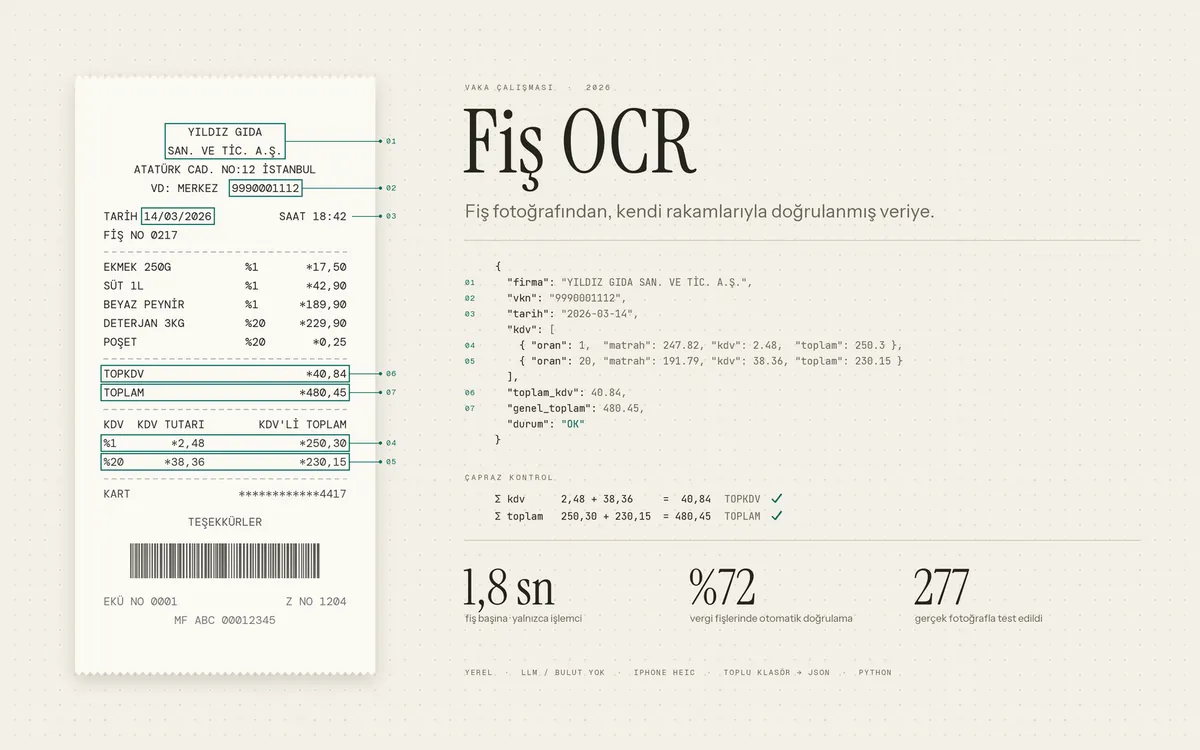
Approach: OCR + rules + self-checking
To read the text I used an OCR engine that runs locally (RapidOCR). The real work was pulling the right fields out of that text. For this I wrote rule-based extraction: company name, tax ID, date, VAT rates and totals are found by their position and patterns on the receipt. Receipts photographed rotated or side by side are separated automatically.
The most important decision was this: the program must never silently write a receipt it isn’t sure about. On a receipt, the VAT amounts have to add up to the “TOPKDV” (total VAT) line, and the per-rate totals have to add up to the grand total. If they do, the receipt counts as “verified”. If they don’t, it is flagged “check this” in the output. That way, mistakes become visible instead of hiding.
How I measured it
I worked with 277 real receipt photos and split them in two from the start: 221 for development, and 56 as a separate test set that my rules never saw. I changed the rules only by looking at the development set and measured the test set at the very end. Without this split, you end up writing rules for the photos you have and reporting better results than reality.
Results:
- On tax receipts (excluding card slips), 72% of receipts were automatically verified by their own numbers.
- Across all photos the verified rate was 59%. The gap comes mostly from card slips, which don’t contain a VAT breakdown.
- Average time per receipt was about 1.7 seconds, CPU only, no graphics card.
There is also something I tried and dropped: shrinking large photos before reading gave roughly a 4% speedup, but it changed one result in the test set. I didn’t risk accuracy for a small speed gain, so that setting stayed off.
iPhone photos and licensing
iPhone photos come in HEIC format. There were two library options for it. Because one of them bundles a GPL-licensed encoder, I used the read-only, LGPL-licensed option. Making sure the code delivered to the client holds no licensing surprises is part of the job.
Deploying it as an API
In the second phase the tool became an HTTPS API running on the client’s own server (2 cores, 4 GB RAM): send a photo, get JSON back. What I focused on:
- Security: the API key, file size and queue checks happen before the request body is read. Images with a very large pixel count are rejected.
- Load test: with sample receipts, about 19 receipts per minute were processed without errors. With 12-megapixel phone photos this drops to about 5 per minute.
- Timeouts: the proxy in front of the server cuts off requests that take longer than 100 seconds. During the load test I saw the queue getting close to that limit, so I capped the queue by number of photos. After that, the worst-case time dropped to 77 seconds.
The delivery included two reports: a test report with the accuracy results and a load test report. The code was delivered together with setup steps and API documentation.
What I learned
- Set aside a separate test set for measurement from the very beginning.
- A tool that can say “I’m not sure” is worth more than one that pretends to read everything.
- Don’t turn on a performance setting until you’ve shown it doesn’t change accuracy.
If you have a similar document problem, send me a few samples and I’ll test them for free and show you the result.